E
edel
Member
- Beiträge
- 7
- Punkte Reaktionen
- 0
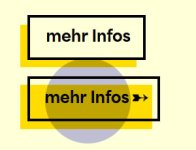
Ich habe einen Button gebastelt , der im FF nicht korrekt angezeigt wird: before:after (z-index: -1) wird beim Firefox nicht nach hinten gesetzt.
Bin neu bei euch und darf noch keinen Link einfügen...
Hier das css:
Hat eventuell jemand eine Idee? Lieben Dank!
Bin neu bei euch und darf noch keinen Link einfügen...
Hier das css:
CSS:
.nectar-button.jumbo.regular.regular-button,
a.gross,
.wpforms-submit-container button {
    position: relative;
    text-decoration: none !important;
    font-weight: 900 !important;
    z-index: 3;
    font-size: 22px;
    border-radius: 0px !important;
    box-shadow: none !important;
    -ms-transform: translateY(0px) !important;
    transform: translateY(0px) !important;
    -webkit-transform: translateY(0px) !important;
    display: inline;
    padding: 10px 8px 15px 22px !important;
    border: 4px solid #000000 !important;
    transition: transform 330ms ease-in-out;
    -webkit-transition: all 0.2s linear !important;
    -moz-transition: all 0.2s linear !important;
    -ms-transition: all 0.2s linear !important;
    -o-transition: all 0.2s linear !important;
    transition: all 0.2s linear !important;
}
html body[data-form-submit="regular"] .container-wrap button[type="submit"] {
    padding: 15px 8px 35px 22px !important;
      background: none !important;
    border-radius: 0px !important;
    color: #000 !important;
    box-shadow: none !important;
}
body[data-button-style="slightly_rounded_shadow"] .container-wrap button[type="submit"]:hover, body[data-button-style="slightly_rounded_shadow"] .woocommerce-cart .wc-proceed-to-checkout a.checkout-button:hover {
    box-shadow: none !important
}
a.gross.gelb {
    background: #FFFFDD
}
.nectar-button.jumbo.regular.regular-button:hover,
a.gross:hover,
.wpforms-submit-container button:hover {
    background-color: rgba(0,0,0,0) !important;
    padding: 10px 15px 15px 15px !important;
}
.nectar-button.has-icon span {
    display: contents;
}

.nectar-button.jumbo.regular.regular-button span,
a.gross span {
    font-weight: 900;
    position: relative;
    right: -10px;
    font-weight: 900 !important;
    font-size: 22px !important;
    font-family: 'Area-Inktrap' !important
}
.nectar-button.jumbo.regular.regular-button span:before,
a.gross:before,
html body[data-form-submit="regular"] .container-wrap button[type="submit"]:before {
    position: absolute;
    z-index: -1 !important;
    left: -14px;
    overflow: visible !important;
    bottom: -14px;
    content: '';
    height: 100%;
    width: 100%;
    background: #FFDD00;
}
.nectar-button.jumbo.regular.regular-button span:after,
a.gross:after,
.wpforms-submit-container button:after {
    position: relative;
    content: '';
    background: url(img/arrow_button.svg) no-repeat;
    height: 12px;
    width: 0px;
    left: 0px;
    top: -1px;
    display: inline-flex;
    opacity: 0;
    margin: 0px 7px 0 7px;
    -webkit-transition: all 0.2s linear !important;
    -moz-transition: all 0.2s linear !important;
    -ms-transition: all 0.2s linear !important;
    -o-transition: all 0.2s linear !important;
    transition: all 0.2s linear !important;

}
.nectar-button.jumbo.regular.regular-button:hover span:after,
a.gross:hover:after,
.wpforms-submit-container button:hover:after {
    width: 22px;
    opacity: 1;
}
Hat eventuell jemand eine Idee? Lieben Dank!