T
turtle
New member
- Beiträge
- 3
- Punkte Reaktionen
- 0
Moin Moin zusammen,
ich habe das Problem, dass sich meine Website nicht an die Bildschirm größe anpasst. Ich habe verschiedene Sachen ausprobiert. (z.B. container).
Ich würde das gerne via HTML einbinden. Mein Code lautet wie folgt:
<!doctype html>
<html lang = "de">
<head>
<meta charset="UTF-8">
<meta name="viewport" content="width=device-width, initial-scale=1">
<meta name="description" content= Fotografie Natur Personen">
<title> Corins Blog</title>
<link href="....." rel="stylesheet" type "text/css">
</head>
<body>
<header>
<nav>
<ul>
......
</nav>
</header>
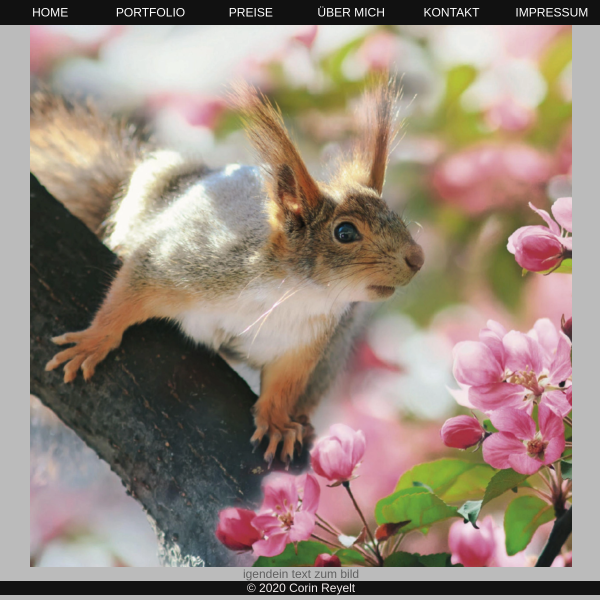
<p><img src ="...."></p>
<footer >
<p>© 2020 CR</p>
</footer>
</div>
</body>
<html>
CSS:
body {
font-size: 150%;
font-family: Arial, Helvetica, sans-serif;
line-height: 2.0;
background-color: #bbbbbb;
color: rgba(14, 13, 13, 0.521);
text-align: center;
}
h1 {
font-size: 200%;
text-align: center;
font-weight: bolder;
font-family: Arial, Helvetica, sans-serif;
line-height: 2.0;
background-color: #bbbbbb;
color: white;
}
nav {
background-color: rgb(17, 17, 17);
}
nav ul {
margin: 0 auto;
display: flex;
list-style: none;
color: rgb(6, 11, 11);
text-align: center;
}
nav a {
text-decoration: none;
color: rgb(250, 244, 244);
display: block;
padding: 0.7rem;
margin: 0;
margin-left:100px;
text-align: center;
right: 5px;
left: 5px;
}
nav a.aktuell {
font-weight: bold;
}
article {
width: 50%;
margin: 0.rem;
padding-bottom: 2em;
}
footer {
position: absolute;
bottom: 0px;
width: 99%;
background-color: rgb(17, 17, 17);
color: rgb(241, 235, 235);
right: 5px;
left: 5px;
}
img {
width: 99%;
height: auto;
position: absolute;
top: 230px;
right: 5px;
left: 5px;
padding: 40;
}
@media screen and (max-width: 530px) {
main {
     display: block;
}
article {
      width: auto;
}
}
HAt jemand eine Idee?
Lieber Gruß!
ich habe das Problem, dass sich meine Website nicht an die Bildschirm größe anpasst. Ich habe verschiedene Sachen ausprobiert. (z.B. container).
Ich würde das gerne via HTML einbinden. Mein Code lautet wie folgt:
<!doctype html>
<html lang = "de">
<head>
<meta charset="UTF-8">
<meta name="viewport" content="width=device-width, initial-scale=1">
<meta name="description" content= Fotografie Natur Personen">
<title> Corins Blog</title>
<link href="....." rel="stylesheet" type "text/css">
</head>
<body>
<header>
<nav>
<ul>
......
</nav>
</header>
<p><img src ="...."></p>
<footer >
<p>© 2020 CR</p>
</footer>
</div>
</body>
<html>
CSS:
body {
font-size: 150%;
font-family: Arial, Helvetica, sans-serif;
line-height: 2.0;
background-color: #bbbbbb;
color: rgba(14, 13, 13, 0.521);
text-align: center;
}
h1 {
font-size: 200%;
text-align: center;
font-weight: bolder;
font-family: Arial, Helvetica, sans-serif;
line-height: 2.0;
background-color: #bbbbbb;
color: white;
}
nav {
background-color: rgb(17, 17, 17);
}
nav ul {
margin: 0 auto;
display: flex;
list-style: none;
color: rgb(6, 11, 11);
text-align: center;
}
nav a {
text-decoration: none;
color: rgb(250, 244, 244);
display: block;
padding: 0.7rem;
margin: 0;
margin-left:100px;
text-align: center;
right: 5px;
left: 5px;
}
nav a.aktuell {
font-weight: bold;
}
article {
width: 50%;
margin: 0.rem;
padding-bottom: 2em;
}
footer {
position: absolute;
bottom: 0px;
width: 99%;
background-color: rgb(17, 17, 17);
color: rgb(241, 235, 235);
right: 5px;
left: 5px;
}
img {
width: 99%;
height: auto;
position: absolute;
top: 230px;
right: 5px;
left: 5px;
padding: 40;
}
@media screen and (max-width: 530px) {
main {
display: block;
}
article {
width: auto;
}
}
HAt jemand eine Idee?
Lieber Gruß!